
Add some PayPlus To your Wix
Payment management using PayPlus
Allow your customers pay as the wish, whether it is Credit card or other payment apps like Apple pay, bit, and more...
From today its easy to control
In the stores revenue through the advanced interface of PayPlus
We do everything so you can focus on sales while we handle what we excel in. You can receive detailed information about your transactions, issued invoices, and full control over credits, detailed reports, full page layout, and a wide range of options to let you focus solely on boosting your stores sales

Defining PayPlus account
In  Sites
Four simple steps
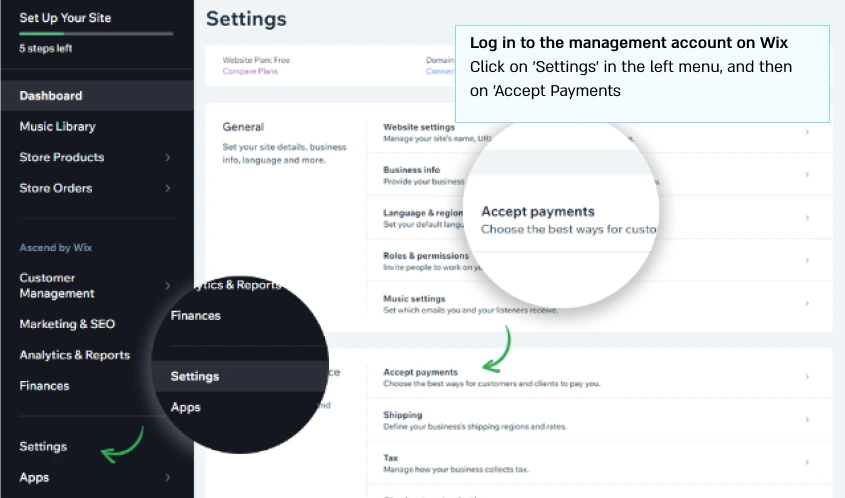
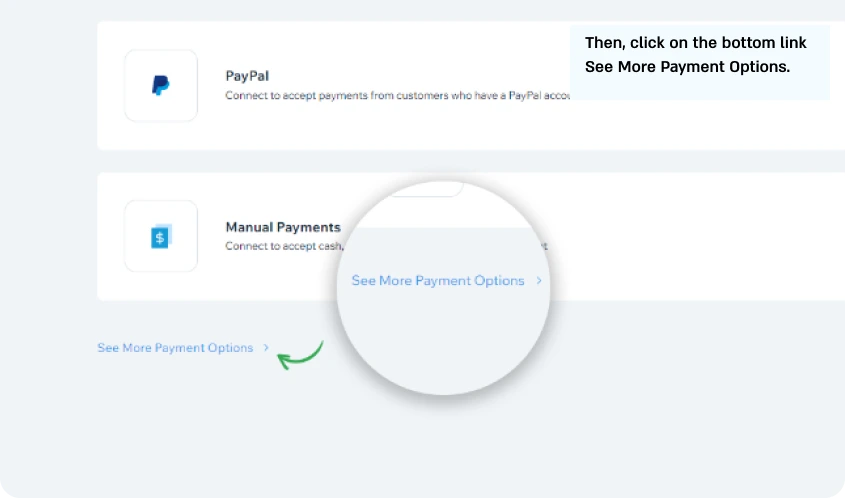
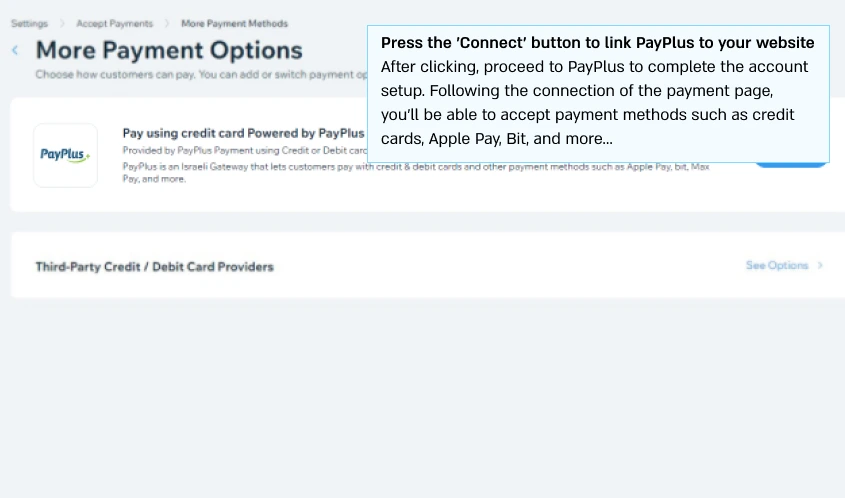
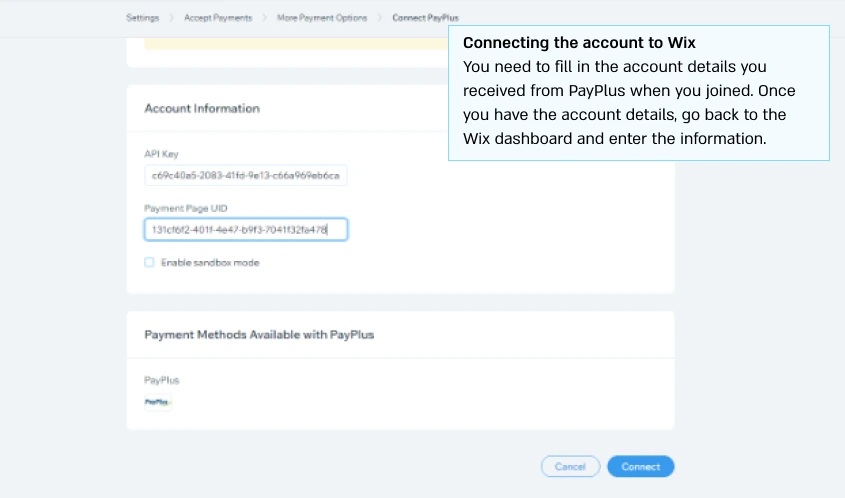
The perfect solution for your Site
Design your checkout page in your websites colors add a logo, and start removing the variety of payment methods that PayPlus has to offer your customers!

FAQ
The Wix system enables selling through a variety of sales channels, including online stores, using mobile devices, Through social networks and online marketplaces. From now on, website owners can easily add a variety of payment solutions using PayPlus, such as: Credit card, PayPal, in-store payment, and phone transaction. By integrating PayPlus, you can also connect additional payment methods such as: Apple Pay, bit, the Max payment app, and soon Google Pay as well!
Through the integration of PayPlus, you will be able to view your transactions using an advanced and innovative interface, To connect, use the specially built application for PayPlus customers, download reports, and analyze the transaction activity of each payment method on your website, Customize the payment page according to your websites design, change the domain of the payment page to match your websites domain, Set up a callback for transaction notifications and a wide range of options!
You can watch our video on how to integrate PayPlus into your store, of course, after opening your account with PayPlus Click Here
PayPlus is integrated with all major invoice companies in Israel(including those we dont always enjoy connecting to)
Through a simple and user-friendly configuration in the management interface of PayPlus, You can integrate the invoice company you work with and set up a trigger for the type of transaction for which you want the document to be generated, Regarding the type of document and the specific document type you would like when issuing a credit
The most important part is that we will attach the document we generated from the invoice company to each transaction in the management interface, So, in practice, you will be able to track whether a document was issued and, of course, what the document is without the need to access the invoice company for verification!
Even if your invoice company was not available at that moment, We will save the request to them, and you will be able to perform a manual query proactively through our interface And to issue the invoice once they resume their activity!
Certainly! With our unique and special collaboration with Cloudflare, you can create a customized address using your own domain and replace the default address we provide with your websites address without the need for purchasing an SSL certificate or complicated setup
The process takes only a few minutes but may take a few hours for the new records to update worldwide
Absolutely! We offer the option to set up Google, Facebook pixels, and configure a callback address for external systems and transaction notifications. And the best part? You can fully customize your payment page, Starting from the page background, uploading your logo, changing the favicon, colors, font of the pages texts, and even the fields themselves!
In addition to Wixs built-in marketing tools, such as advanced SEO tools, an automatic system for creating email campaigns, social media, and more, Enabling businesses to drive traffic to their website and reach new customers and audiences.
First of all, welcome! All you need to do is access your management interface in PayPlus, Go to the settings in the right menu, click on "Manage other payment methods" and simply click on the "Add Payment Method" button Then choose the payment method you want to support on your payment page
A representative will get back to you with the costs and explanations of the services, and upon your approval, the payment method will be installed on the payment page, Your customers will be able to choose from all the available options for payment on your payment page!
Certainly! With the advanced interface of PayPlus, you can choose to add terms and conditions. to your payment page, which your customers will be required to accept, You can also choose whether the terms and conditions will open in a new page or in a pop-up window!
